


Don’t Tell
OpenBao is a tool for securely managing secrets. It originated as a fork when HashiCorp revoked the open source status of the Vault secrets manager, placing it under the Business Source License. This move severely restricted free, commercial use and locked out cloud providers without a license. Today, a growing ecosystem of partners such as Adfinis and GitLab provide enterprise products and support, together with an active community. Originally a fork of Vault 1.14, the last release under Mozilla Public License (MPL) 2.0, OpenBao is now managed by the Open Source Security Foundation (OpenSSF) as a sandbox project.
Flexible Secrets Management
The feature sets of the Vault original and its OpenBao fork are very similar; both store sensitive data. A secret can be anything that you do not want to be in the public domain, such as passwords, API keys, TLS certificates, SSH credentials, database access credentials, or tokens for cloud providers. The software controls the use of secrets and centralizes, automates, and prevents disclosure. OpenBao offers its services over a web interface, a command-line interface (CLI), or an API (Figure 1). For the API, clients use agents or custom scripts, and the web interface runs in any recent browser. Developer mode makes it easy to get started and discover the tool’s capabilities.
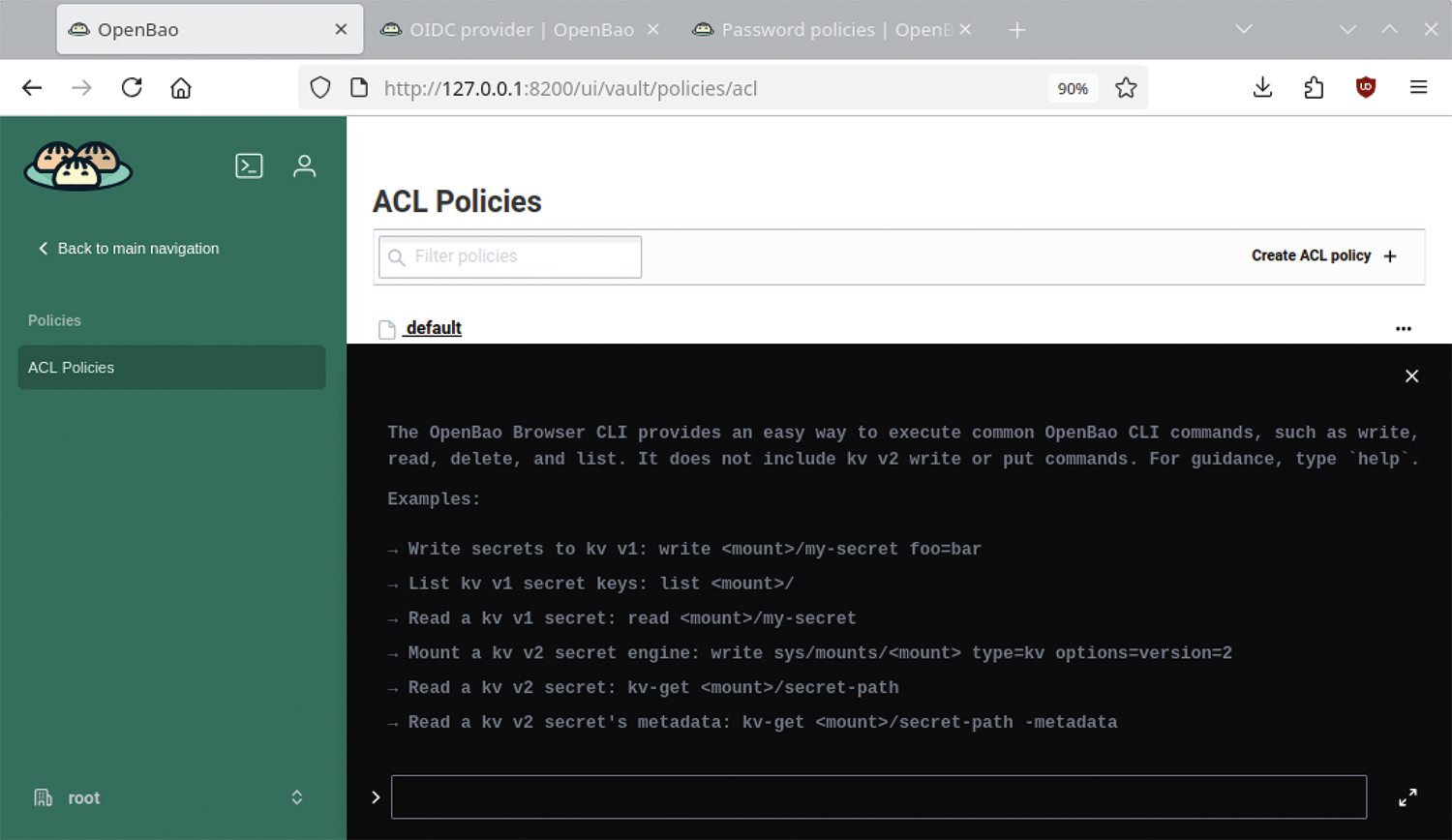
OpenBao stores all your secrets in encrypted storage with the use of dynamic secrets to generate access credentials (e.g., for databases or cloud services) and even for use on demand and with automatic expiration dates. Policies or access control lists (ACLs) ensure granular control over who is allowed to access which secrets, whereas audit logging records access events to fulfill compliance and security requirements. On top of this, OpenBao can provide an API-based encryption service (encryption as a service) to remove the need for significant amounts of cryptographic code in your own applications.
OpenBao is highly flexible; generated secrets can expire after a defined time to live (TTL) or be revoked automatically (secret leasing and revocation). Temporary access credentials can be provided for applications that require a database connection, and OpenBao generates ephemeral identity and access management (IAM) tokens for accessing cloud resources such as AWS. OpenBao centralizes the management of keys for development teams that need access to various APIs, just as it does for public key infrastructures (PKIs), where it always makes sense to automate the process of creating, distributing, and renewing certificates.
Secure, Temporary Access Credentials
Imagine you want to grant an application temporary access to a database without having to store permanent credentials in the code or in a configuration file. The OpenBao approach proceeds as follows: An app asks the server for permission to access the database. The tool generates temporary credentials (e.g., valid for one hour) and sends them to the client. The client then has 60 minutes to use the credentials, after which login permission expires.
Because static credentials are no longer required, developers never get to see the login credentials, and potentially compromised data expires automatically, significantly improving the organization’s security posture. For this sequence to take place, OpenBao encrypts all data in memory and uses SSL/TLS during transmission. It also offers a seal/unseal mechanism: On startup, each storage unit first needs be unsealed, much like a high-security safe in a bank. Unsealing (i.e., essentially opening or unlocking the storage) requires one or more keys, the use of which is recorded in audit logs, as is every occurrence of access to a secret.
To do so, OpenBao uses tokens that are linked to a policy. Each policy is path-based with rules that restrict the actions and access to those paths. OpenBao gives you the option of creating and assigning tokens manually, with a self-service option that issues a token when clients log in. That said, the intended approach is to use authentication methods that support seamless client integration, identification, and revocation as needed.
The OpenBao workflow comprises four phases: Once a client has been verified by an authentication method, a token and an associated policy are generated, typically by validating the client (human or machine) with trusted sources such as identity providers (OIDC or LDAP). The client then uses the token to initiate a query and, if the comparison with the OpenBao security policy is successful, gains access to the secrets.
Policies consist of a ruleset that defines the API endpoints a client can access with its OpenBao token. The individual rules grant or deny access to specific paths and operations in OpenBao, but also to secrets, keys, and encryption functions. To this end, the secrets manager issues a token that maps the client’s identity and associated policies, which the client is then authorized to use in the future.
Installing OpenBao
You can test OpenBao several ways: It is available in many standard repositories; you can pick up precompiled binaries or find container images in popular registries; and you can install from source code or use a Helm chart. Regardless of your choice, the installation typically follows the same pattern: Retrieve or build binaries (or images), verify signatures, install OpenBao and unseal it (this is where the unseal key comes into play), and start the configuration. Afterward, make sure that the OpenBao server launches and unseals automatically.
Depending on your specific use case, the configuration involves numerous steps that vary from one instance to another: Parameters such as the server address, port, user interface (UI) settings, storage back end, API settings (API address and port), and TLS certificates must be defined, as well as logging settings such as log verbosity and storage location. Other settings define authentication and security (e.g., for sealing, unsealing, and revoking the root token). Many organizations run OpenBao as a cluster of highly available OpenBao servers. In most cases, two or three clusters are even used as playground, integration, or production environments.
To get started quickly on Linux, installing OpenBao from the standard repository makes sense. For example, use zypper to install openbao on openSUSE. To display the CLI command set, use the bao ‑h help option; the bao command not only controls the server but also handles a number of client functions. Running the help option against each of the entries displays more details.
To start a development or test server (with transient content), type
bao server ‑devand define the BAO_ADDR environment variable to avoid tedious typing later on. The command
export BAO_ADDR='http:// localhost:8200'; bao server ‑devlaunches the server and returns both a root token and an unseal key (Figure 2). The web interface is now available on port 8200 of the local computer, and you can launch it in your browser as http://localhost:8200. Be careful, though: All the data in this instance is temporary and will not persist. After stopping and restarting with the bao command, you will have a completely empty server again. Working with the web GUI, enter your root token in the Token field. Now log in and you will be taken to the Secrets Engine page where you should discover a fully functional, but still fairly empty, OpenBao server.
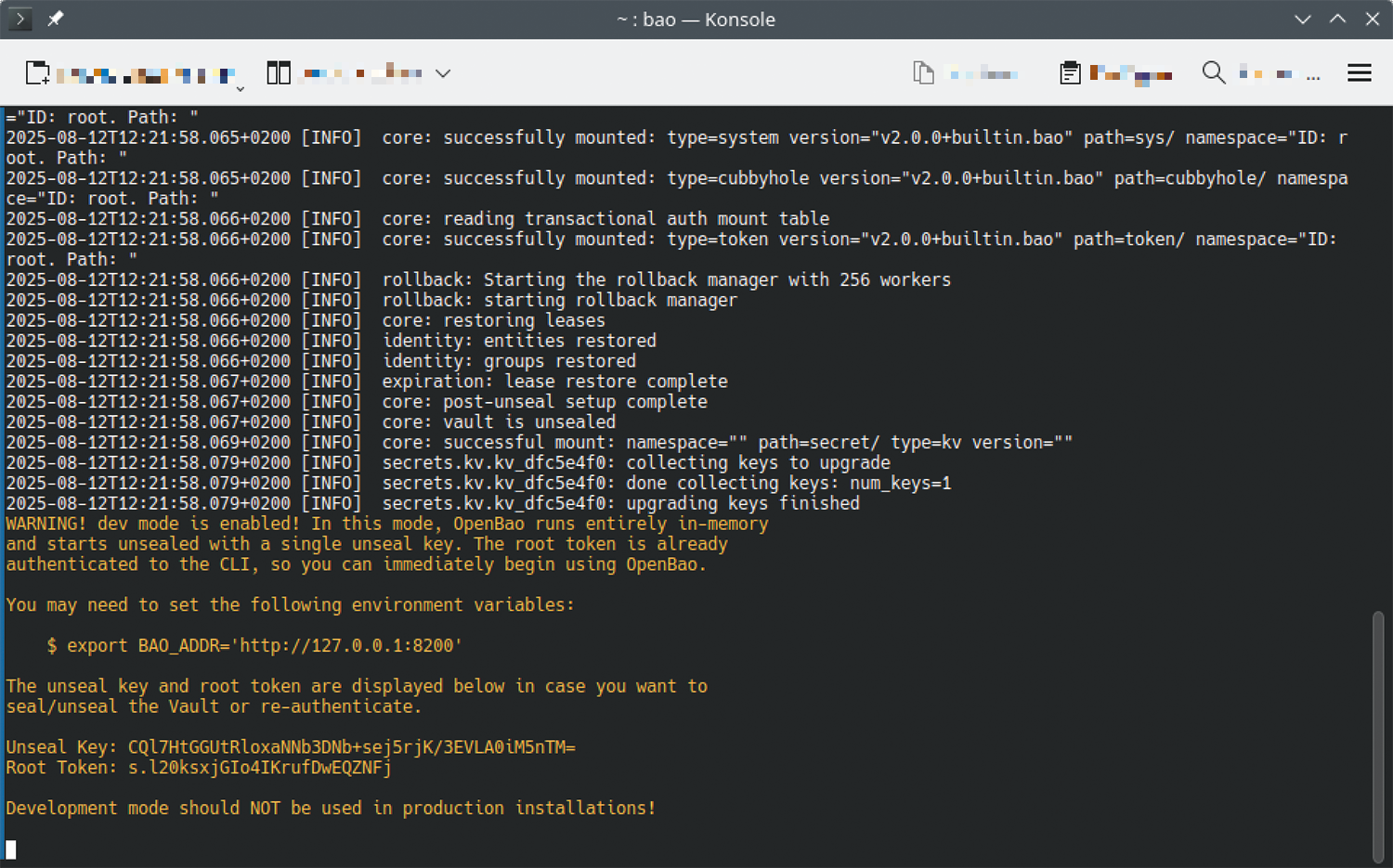
The root token allows privileged and anonymous access to OpenBao and is only intended for initial configuration and emergencies. You should always work with restricted personal user accounts. In this context, least privilege access means that although admins can operate the platform, they do not have access to the teams’ secrets.
Sealing and Unsealing
You can access the sealing mechanism from the Seal OpenBao button; you were given the Unseal Key during setup (bottom of Figure 2). Sealing an instance tells the OpenBao server to stop responding to access requests until the seal is lifted. Access is only restored after you reopen the vault with the unseal command (on the CLI, web interface, or API). OpenBao servers typically start up in a sealed state. Although the software knows where to find its data, which storage back end to use, and so on, it cannot decrypt the secrets. For the development server in this example, sealing and unsealing are handled automatically for learning and testing purposes.
The default OpenBao configuration uses a Shamir seal: The unsealing key is not distributed directly to one or more users but is split into parts following the Shamir’s Secret Sharing algorithm. A certain number of parts (the threshold) are required to reconstruct the unsealing key, which is then used to decrypt the root key. To do this, the parts of the key are added one after another (in any order) until enough of them are present to reconstruct the key. Incidentally, the Shamir process (the unseal ceremony) is also used to generate a root token for emergency access. For production environments, however, Auto Unseal is typically used to ensure that servers are operational after a reboot.
The bao operator command is very useful because it enables a range of subcommands for operation and management:
bao operator initinitializes a new OpenBao cluster by generating a root key and preparing the storage back end.bao operator unsealunseals an OpenBao server.bao operator sealseals an OpenBao server, preventing it from performing any further operations.bao operator rekeygenerates a new set of unseal keys.bao operator validate‑configvalidates the OpenBao configuration.bao operator diagnoseenables the diagnosis of problems.
If you happen to lose your root token and suddenly find yourself locked out, running
bao operator generate‑rootcreates a new one. Entering
bao statuslets you check whether your commands were successful or failed. All of these commands are explained in great detail in the comprehensive online documentation.
Setting Up a Secrets Engine
For OpenBao to provide its services, it needs a secrets engine – that is, a method for storing secrets. Two engines are active on the Developer Mode server: Cubbyhole for per-token private secret storage, and Secret for key/value (KV) secret storage. Selecting Secrets engines in the main menu of the browser interface gives you access to the Enable a Secrets Engine selection screen (Figure 3), where you can enable options such as KV storage, PKI Certificates, SSH, Databases, RabbitMQ, Kubernetes, or a time-limited one-time password (TOTP). You can achieve the same results on the command line with:
bao secrets enable ssh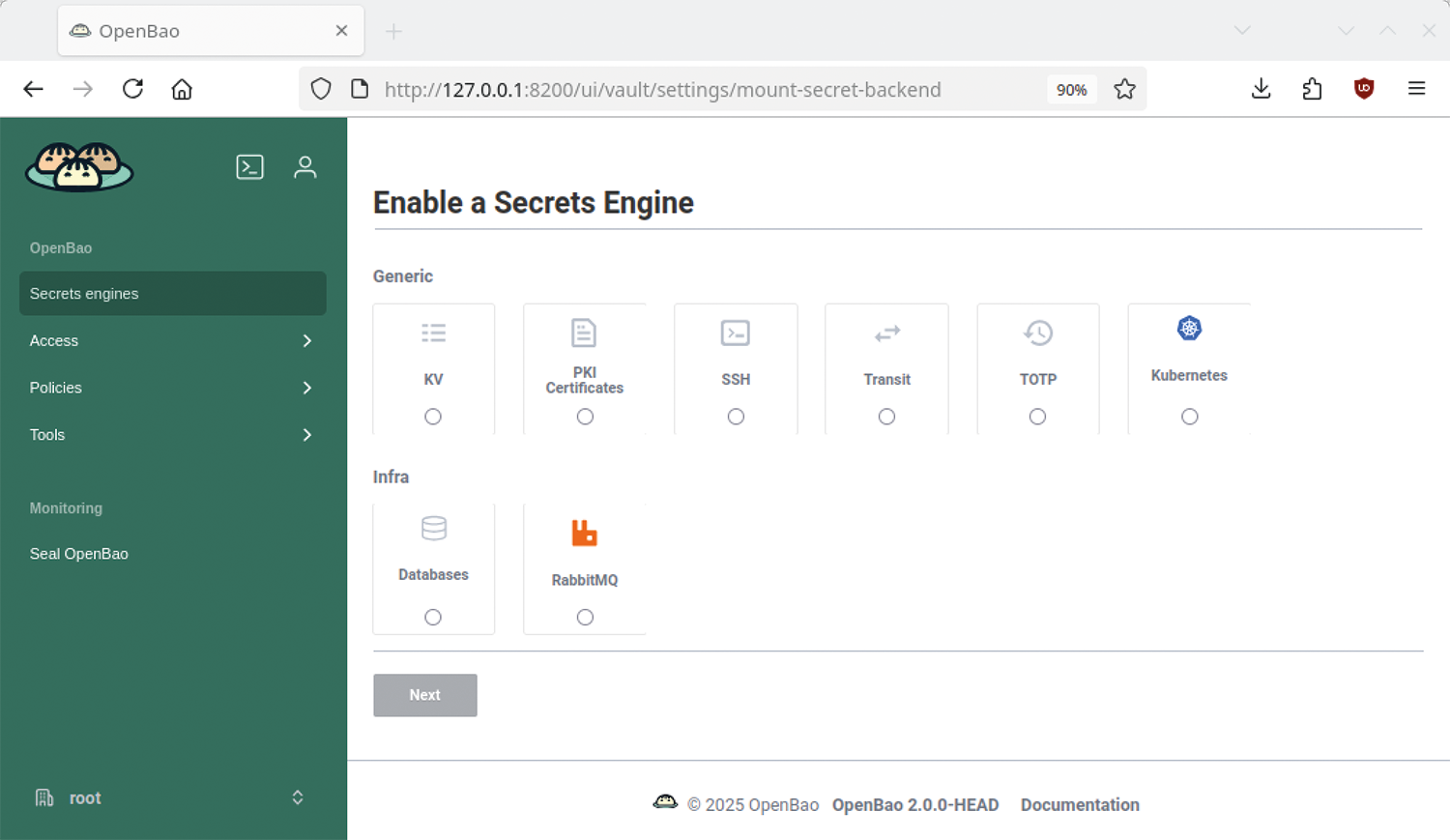
The server will then report Success! Enabled the ssh secrets engine at: ssh/ and display a third entry for SSH in the Secrets engines tab of the web interface. The next step is to configure the back end and create a role for SSH, which can also include a one-time password (OTP).
Also important is configuring the client systems in each case. With SSH, the OpenBao server can use both OTPs and PKI functions – for example, if you require the SSH key to be signed by a certificate authority (CA) before access is granted. Although possible with OpenBao, you do need the matching settings in the clients’ SSH or pluggable authentication module (PAM) configurations. The SSH-CA method with OpenBao is preferable in this case because it provides temporary SSH access in a way that is both elegant and secure, without having to store public keys or passwords permanently on servers.
OpenBao (temporarily) signs the public keys that clients use for authentication with SSH servers. The server exclusively accepts keys signed in this way if it trusts the CA. To make sure, you need to tag the CA public key as trusted server-side and add it to the /etc/ssh/trusted‑user‑ca‑keys.pem file on the target server. To do so, you first need to retrieve the CA public key (with root privileges) from OpenBao:
bao read ‑field=public_key ssh/config/ca > trusted‑user‑ca‑keys.pemNext, set the following values in the OpenSSH SSH server’s configuration file (/etc/ssh/sshd_config):
TrustedUserCAKeys /etc/ssh/trusted‑user‑ca‑keys.pem
PubkeyAuthentication yes
To restart the service, type:
sudo systemctl restart sshdYou can now test the connection with the key provided by OpenBao. If everything works, users will be able to log in to the target server, without the client key ever having been stored there, although you will need to maintain the revocation list manually at this point.
OpenBao with GitLab CI Pipelines
OpenBao includes its own OpenID Connect (OIDC) provider, offers roles and policies, and supports various authentication methods, including multifactor authentication, OTP, namespaces, ACLs, and group-based rules (Figure 4). The two SSH examples discussed here are merely intended as starting points for developing your understanding of OpenBao, because the software also supports integration with more complex mechanisms. Some caution is advised if you follow some of the many online guides, because they use scripts or even root tokens to hack the seal/unseal mechanism. This kind of approach is only suitable for initial tests; under no circumstances would you want to use it in a production environment.
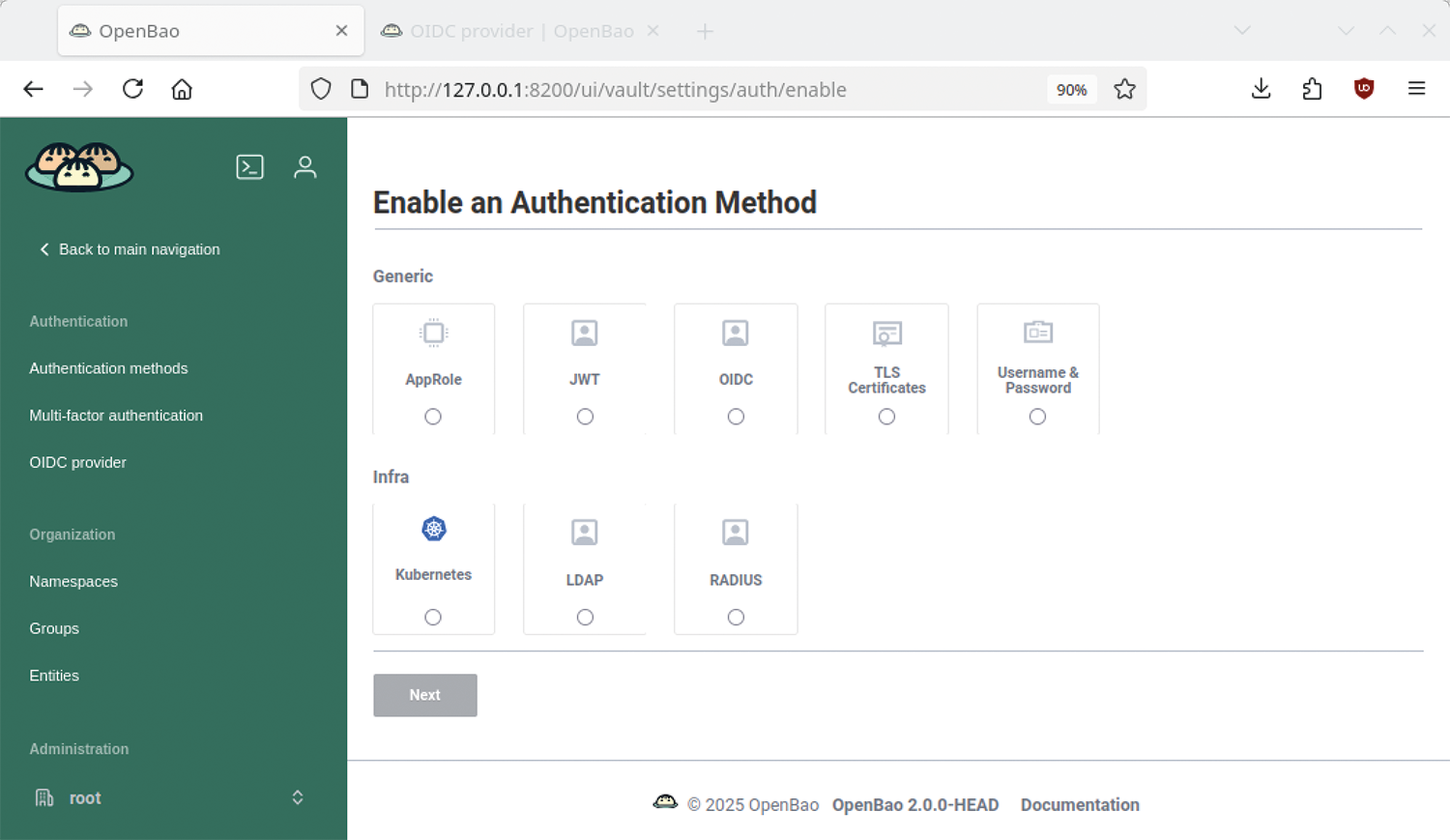
Many organizations establish pipelines to automate development and deployment, and because GitLab continuous integration (CI) pipelines will integrate seamlessly and securely with OpenBao, it has become the go-to approach among admins. In the pipeline workflow, the GitLab platform generates a JSON Web Token (JWT), which in turn enables strong authentication by OpenBao. To integrate this kind of pipeline, you first need to enable and configure OIDC as the authentication method in OpenBao. The interplay of roles and policies enables granular control over access to GitLab groups, projects, and pipelines.
As a final step, you need to add instructions to the pipeline to log it into OpenBao with the JWT and to give it the ability to read the appropriate secrets at runtime. From then on, OpenBao will communicate transparently in the background with the GitLab platform to verify JWTs and check whether the requested access is permitted.
Conclusion
OpenBao is a powerful and extremely complex tool. Despite extensive documentation and an active community, the learning curve remains steep, and users might initially feel overwhelmed by the sheer number of configuration options, command-line options, and features. Even the clear-cut web interface and the well-organized CLI are not much help: The feature scope is simply vast. At the same time, though, it is a testament to OpenBao’s flexibility and its ability to implement state-of-the-art requirements for secrets management with free software.