

The move toward self-hosted infrastructure is not limited to application hosting, databases, or observability tools. Source code management, issue tracking, release workflows, and CI/CD pipelines are also becoming part of the discussion. For many teams, hosted platforms such as GitHub or GitLab are convenient defaults, but they also centralize source code, access control, project planning, packages, and deployment automation on platforms outside the team's direct control.
Forgejo is a lightweight self-hosted software that provides Git repository hosting, issue tracking, pull requests, package hosting, and CI/CD features. It started as a fork of Gitea and has since become an independent project with its own governance, release process, and technical direction. For organizations that want a practical alternative to large commercial developer platforms, Forgejo offers a familiar workflow without requiring a large operational footprint.
In this article we will take a look at Forgejo, install it on a server, create a first repository, configure basic collaboration features, enable CI/CD with Forgejo Actions, and review some of the operational and security aspects that administrators should consider before using it in production. Table 1 provides basic information about the Forgejo project.
| Name: | Forgejo |
|---|---|
| URL: | https://forgejo.org/ |
| License: | GPLv3+ |
| Documentation: | https://forgejo.org/docs/ |
| Initial Fork: | December 2022 |
| Latest Major Release: | Forgejo 15.0, released April 16, 2026 |
| Managed Public Instance: | https://codeberg.org/ |
Why Forgejo?
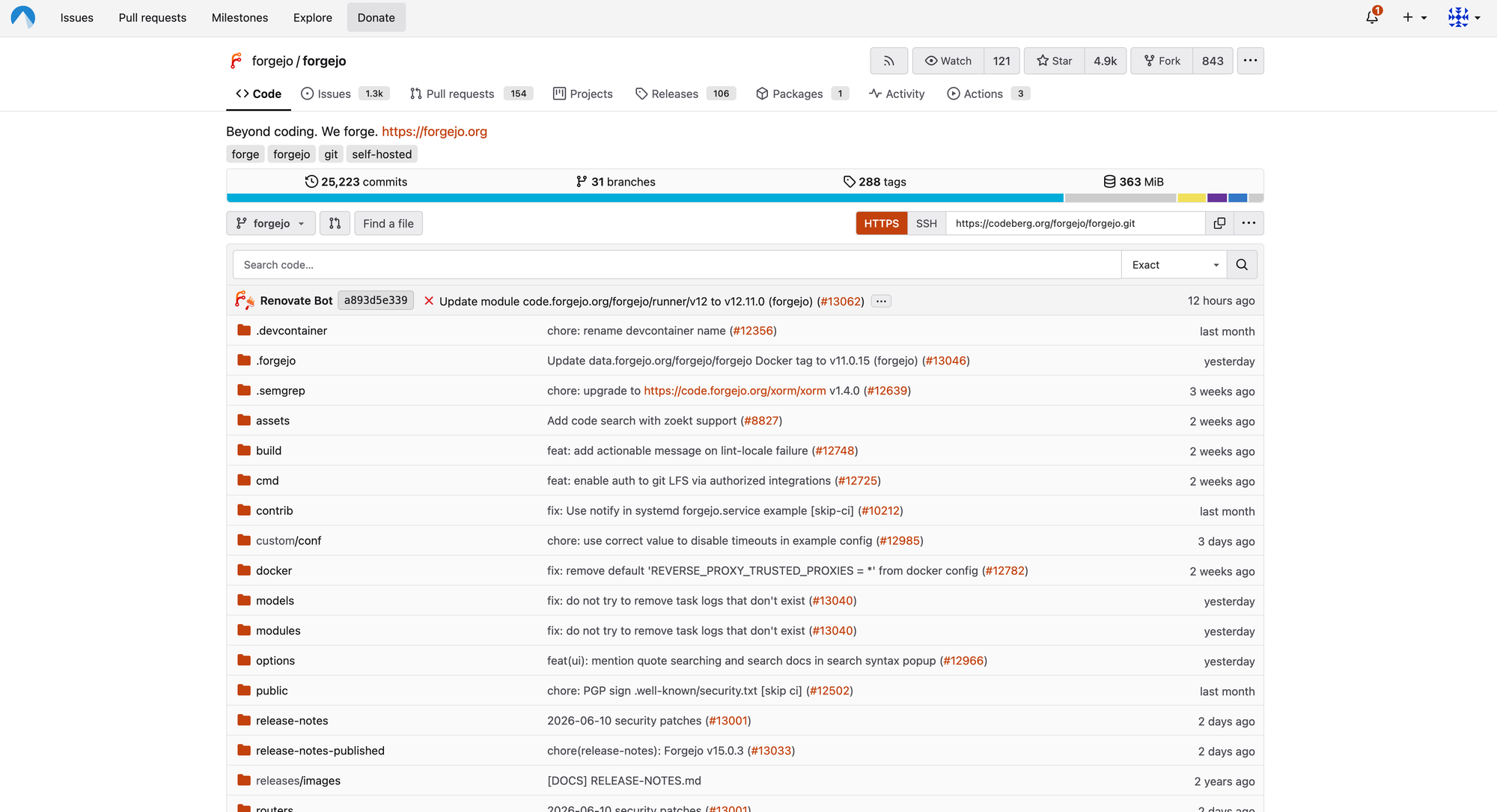
Forgejo provides the core features most development teams expect from a Git platform. Users can create repositories, manage branches, review changes through pull requests, track issues, publish releases, and collaborate through a web interface. The user experience will feel familiar to anyone who has used Gitea, GitHub, or GitLab before (Figure 1).
The biggest difference is the operational model. Forgejo is designed to be installed on your own infrastructure and maintained by your own team. It is written in Go and can be deployed as a single binary, as a container, or through distribution packages depending on the target system. For smaller teams, agencies, research groups, open source communities, or internal development departments, this makes it attractive because it does not require a large amount of hardware or administrative effort.
Forgejo is not trying to be a complete all-in-one DevSecOps platform with every possible enterprise feature. Instead, it focuses on being a practical software forge: source code, collaboration, automation, and project management in one place. That simplicity is one of its strongest arguments. It is small enough to understand, easy enough to install, and still complete enough to cover the daily workflow of many development teams.
Why Forgejo Forked from Gitea
Forgejo is closely connected to Gitea's history. It began as a community fork after disagreements around Gitea's governance and project control. In its early phase, Forgejo stayed close to Gitea and synchronized many changes from upstream. In 2024, however, the project decided to become a hard fork. While Forgejo's roots in Gitea are still visible all over the code and configuration parameters with many variables still carrying the name "gitea," Forgejo is no longer just a downstream variant of Gitea but an independent project with its own roadmap.
For technical users this matters because the two projects may become less compatible over time. Existing Gitea users should not assume that future migration paths will always be simple, especially from newer Gitea versions. Anyone planning a migration should read the current Forgejo migration documentation carefully, create a full backup, and test the upgrade path before touching production data.
The governance aspect is just as important. Forgejo is developed under the umbrella of Codeberg e.V., a democratic non-profit association focused on free software. This gives Forgejo a different character from vendor-controlled platforms and is one of the main reasons many users see it as a community-owned alternative to Gitea. Having said that, it is important to understand that while a documented migration path still exists from Gitea to Forgejo, this step will become more cumbersome in the future as Forgejo's development as an independent application continues.
How to Install Forgejo
Forgejo can be installed in several ways. The three most common options are running the official binary directly on a Linux server, deploying the container image with Docker or Podman, or installing Forgejo on a Kubernetes cluster. The binary installation is simple and transparent, while the container-based setup is often easier to integrate into existing infrastructure-as-code or reverse proxy setups.
For a small test instance, the binary installation is straightforward. Create a dedicated system user, download the correct binary for your platform, make it executable, and run it. The application runs out-of-the-box with sane defaults, e.g., an SQLite database. A simplified installation flow looks like this:
sudo adduser \
  --system \
  --shell /bin/bash \
  --gecos 'Forgejo Version Control' \
  --group \
  --disabled-password \
  --home /home/git \
  git

sudo mkdir -p /var/lib/forgejo/{custom,data,log}
sudo chown -R git:git /var/lib/forgejo
sudo chmod -R 750 /var/lib/forgejo
After that, download the Forgejo binary; place it, for example, in /usr/local/bin/forgejo; and create a systemd service that starts Forgejo as the git user. For production use administrators should follow the official documentation.
As a security precaution, always verify downloaded binaries before executing them. Forgejo publishes release artifacts and signatures, and administrators should make verification part of their normal installation and upgrade procedure. This is especially important because a source code platform is a high-value service: If the forge is compromised, attackers may gain access to source code, deployment secrets, CI/CD tokens, and release artifacts.
Once Forgejo is started, open the web interface in a browser. The first page presents the initial setup form. Here you configure the database, application URL, SSH server domain, repository root path, mail settings, and the initial administrator account. For small test installations SQLite is sufficient, but production deployments should generally use PostgreSQL or MySQL/MariaDB.
HTTPS and Reverse Proxy Setup
Forgejo can listen directly on an HTTP port, but production instances should be placed behind a reverse proxy such as NGINX, Caddy, Apache, or Traefik. The reverse proxy terminates TLS, redirects HTTP to HTTPS, and forwards requests to Forgejo.
A simple NGINX configuration looks like this:
server {
    listen 80;
    server_name forge.example.com;

    location / {
        return 301 https://$host$request_uri;
    }
}

server {
    listen 443 ssl http2;
    server_name forge.example.com;

    ssl_certificate /etc/letsencrypt/live/forge.example.com/fullchain.pem;
    ssl_certificate_key /etc/letsencrypt/live/forge.example.com/privkey.pem;

    location / {
        proxy_pass http://127.0.0.1:3000;
        proxy_set_header Host $host;
        proxy_set_header X-Real-IP $remote_addr;
        proxy_set_header X-Forwarded-For $proxy_add_x_forwarded_for;
        proxy_set_header X-Forwarded-Proto $scheme;
    }
}
If you use Caddy, the configuration is even shorter because certificate handling is built-in:
forge.example.com {
    reverse_proxy 127.0.0.1:3000
}
After configuring the reverse proxy, make sure that Forgejo's ROOT_URL setting matches the public HTTPS URL. If this is wrong, users may receive incorrect clone URLs, broken links in notification emails, or redirects to the internal HTTP address.
Installing Forgejo on Kubernetes
Forgejo can also be installed on Kubernetes using the project's official Helm chart. This is the better option when your organization already runs applications on Kubernetes and wants Forgejo to follow the same deployment, backup, ingress, monitoring, and GitOps workflows as the rest of the infrastructure.
The official chart is published as an OCI Helm chart and is listed on Artifact Hub: https://artifacthub.io/packages/helm/forgejo-helm/forgejo. The chart's source code and issue tracker are available here.
A minimal test installation looks like this:
helm install forgejo oci://code.forgejo.org/forgejo-helm/forgejo
For production use, you should not rely on the defaults alone. Create a values.yaml file and configure at least the public root URL, ingress, persistence, database settings, mail settings, and resource limits. An example for a more production-ready installation looks like this:
gitea:
  metrics:
    enabled: true
    serviceMonitor:
      enabled: true
  config:
    metrics:
      TOKEN: SCRAPE_TOKEN_PLACEHOLDER
    mailer:
      ENABLED: true
      USER: SMTP_USER_PLACEHOLDER
      PASSWD: SMTP_PASSWD_PLACEHOLDER
      FROM: SMTP_SENDER_PLACEHOLDER
      PROTOCOL: smtps
      SMTP_ADDR: SMTP_SERVER_NAME_PLACEHOLDER
      SMTP_PORT: SMTP_SERVER_PORT_PLACEHOLDER

podSecurityContext:
  fsGroup: 1000
  runAsUser: 1000
  runAsGroup: 1000
  runAsNonRoot: true
  seccompProfile:
    type: RuntimeDefault

containerSecurityContext:
  capabilities:
    drop: [ALL]
  readOnlyRootFilesystem: true
  allowPrivilegeEscalation: false

ingress:
  enabled: true
  className: traefik-public
  annotations:
    cert-manager.io/cluster-issuer: letsencrypt-production
  hosts:
  - host: forge.example.com
    paths:
    - path: /
      pathType: Prefix
      port: http
  tls:
  - secretName: forge-example-com-tls
    hosts:
    - forge.example.com

persistence:
  size: 50Gi
Helm Values vs. Forgejo app.ini Values
The structure of values provided to the Helm chart can be confusing at first because some values are specific to the chart while others are directly passed to the app.ini file used by Forgejo and created by an init container upon startup of the Forgejo Pod: All values passed to the chart as part of gitea.config are directly passed to the app.ini file so you can look up all possible settings on the project's configuration cheat sheet page. An example of where this confusion hits is in setting SSH signing for commits created by Forgejo itself (e.g., for merge commits):
First, you set the following Helm values:
signing:
  enabled: true
  ssh:
    existingSecret: forgejo-ssh-signing-key
This causes the chart to configure the Forgejo container in a way that it mounts the given Kubernetes secret into an init container which then puts the private SSH key into a default location and also extracts the public key and stores it in a pre-defined default location which is then used by the main Forgejo container to consume both keys for commit signing. The Kubernetes secret you pass in here must have the private SSH key stored in the privateKey field.
Then, in order to configure Forgejo itself to consume the SSH key, you also need to set the following Helm values:
gitea:
  config:
    repository.signing:
      FORMAT: ssh
      SIGNING_KEY: /data/git/.ssh-signing/key.pub
      SIGNING_NAME: "My Forge"
      SIGNING_EMAIL: "noreploy@forge.example.com"
The official documentation provides an in-depth explanation of how commit signing is configured in Forgejo.
The chart can deploy Forgejo together with database and cache dependencies, but larger installations should consider using separately managed PostgreSQL, Redis, and object storage. This makes upgrades, backups, monitoring, and disaster recovery easier to reason about.
Running Forgejo on Kubernetes does not remove the normal operational responsibilities. Persistent volumes still need to be backed up, the database still needs a restore procedure, and CI runners should still be isolated from the main Forgejo deployment. If Forgejo Actions are enabled, it is usually better to run the runners as separate workloads or on separate nodes so that arbitrary CI jobs do not share the same trust boundary as the Forgejo server itself.
Kubernetes is therefore not necessarily the simplest way to run Forgejo, but it can be the cleanest option for teams that already operate Kubernetes clusters and manage applications through Helm, Flux, Argo CD, or another GitOps workflow.
Creating the First Repository
After installation, log in as the initial administrator and create a first user or organization. Forgejo supports both personal repositories and organization-owned repositories. For teams, organizations are usually the better structure because they allow you to group repositories, manage teams, and separate permissions more clearly.
Click the + button in the top navigation, select New Repository, choose the owner, enter a repository name, and decide whether the repository should be public or private. This is a very well-known workflow for anyone familiar with GitHub or GitLab. Forgejo can initialize the repository with a README, .gitignore, and license file, or you can create an empty repository and push an existing local project.
If SSH is enabled, users need to add their public SSH keys in their account settings. This also works much like GitHub or GitLab. After the key is added, users can clone and push without entering their password every time. HTTPS cloning is also possible, usually with access tokens rather than account passwords.
Issues, Pull Requests, and Projects
Forgejo includes issue tracking, pull requests, labels, milestones, assignments, and comments. For many teams this is enough to manage day-to-day development without adding a separate project management system. Issues can be linked to pull requests, milestones can group work into releases, and labels can represent bug reports, feature requests, priorities, or internal workflows.
Pull requests support code review discussions, status checks, merge commits, squash merges, and rebase workflows depending on the repository configuration. Branch protection rules can be used to prevent direct pushes to important branches and to require pull requests before merging.
The project management feature exists, but it is still more limited than what many users know from GitHub Projects or GitLab issue boards. For small teams this may not matter. For larger organizations that rely heavily on advanced planning workflows, cross-repository boards, automation rules, custom fields, and portfolio views, Forgejo's project management features should be evaluated carefully before migration.
This is a recurring theme with Forgejo: It covers the most common workflows well, but it does not try to replicate every advanced enterprise feature of much larger platforms.
Teamwork and Permissions
Forgejo supports users, organizations, teams, and repository-level access control. Inside an organization, teams can be granted different permissions on different repositories. This makes it possible to model common structures such as developers, maintainers, reviewers, release managers, or external contributors.
Permissions are more fine-grained than the very simple admin/member model found in some lightweight self-hosted tools. Teams can receive read, write, or administrative access, and repository owners can control who can push, create branches, manage issues, or administer settings.
For internal teams this is usually sufficient. However, administrators should still test the exact workflows they want to enforce, especially when they include collaborators from outside their organization. Permission models often look simpler in documentation than they are in daily use. Before inviting contractors, customers, or external collaborators, create a test organization, configure the intended access model, and verify what each role can actually see and do.
User onboarding also deserves attention. Forgejo supports local accounts but production instances often integrate with LDAP, OAuth2, OpenID Connect, or other external identity providers. Using an existing identity provider reduces account sprawl and makes on-/offboarding easier. If an employee leaves the organization, disabling one central account is safer than remembering to remove local accounts from every internal service.
Forgejo Actions
Forgejo Actions provides CI/CD functionality similar in concept to GitHub Actions (Figure 2). Workflows are stored in the repository, typically in .forgejo/workflows (.github/workflows works, too, though), and are executed by separate runner processes. This allows teams to run tests, build packages, create container images, publish releases, or deploy applications directly from Forgejo.
A minimal workflow might look like this:
on:
  push:
    branches:
      - main

jobs:
  test:
    runs-on: docker
    steps:
      - uses: https://code.forgejo.org/actions/checkout@9c091bb21b7c1c1d1991bb908d89e4e9dddfe3e0 # v7.0.0
      - run: go test ./...
An interesting detail is the uses field here which points to code.forgejo.org. While on GitHub you would normally just say uses: actions/checkout@..., in Forgejo you can use a URL to point the runner to an action hosted anywhere. If you leave the actions/checkout in, Forgejo will try to pull the action from the configured default location (usually https://data.forgejo.org) which might not provide the given action. The Forgejo team mirrors many actions at https://code.forgejo.org/actions/, which is especially convenient because your runner will easily run into API rate limits when pulling actions from GitHub unauthenticated.
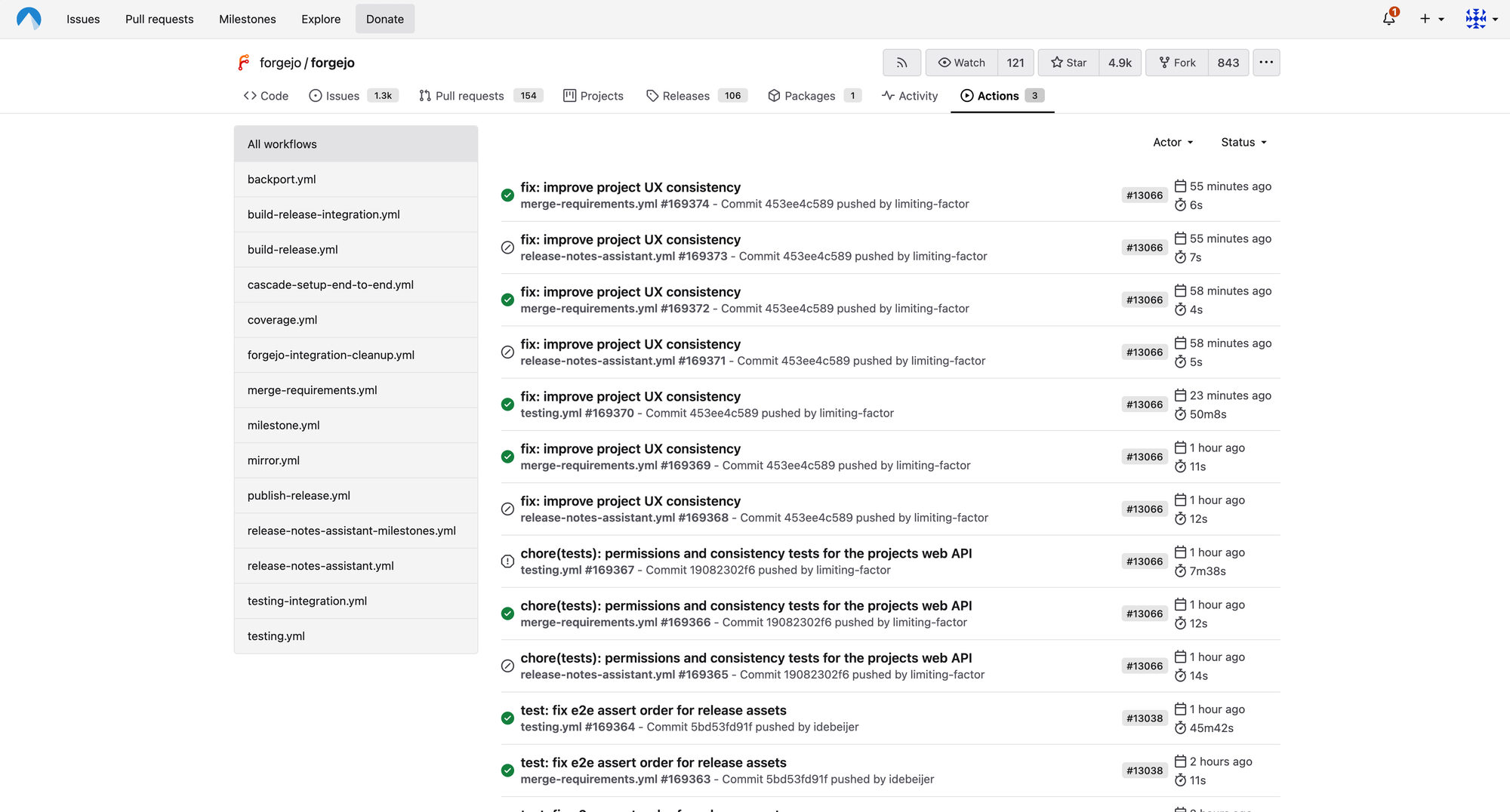
The important operational detail is that Forgejo itself does not execute these jobs. Runners must be installed and registered separately. A runner connects to the Forgejo instance, receives jobs, and executes them in the configured environment. This design is flexible, but it moves responsibility to the administrator.
For trusted internal projects, a small number of Docker- or Podman-based runners may be enough. For public repositories or untrusted contributors, runner isolation becomes much more important. CI jobs can execute arbitrary code from the repository. That code may try to read secrets, access the network, consume CPU and memory, or attack the host through misconfigured container privileges.
Administrators should treat CI runners as potentially dangerous execution environments. Use separate machines or virtual machines for runners, avoid mounting the host Docker socket unless you fully understand the consequences, restrict network access where possible, and do not expose sensitive credentials to workflows that can be modified by untrusted users.
Forgejo Actions is one of the most useful features of the platform, but it is also one of the features that requires the most operational discipline. Read more about hosting actions here.
Package Registry and Releases
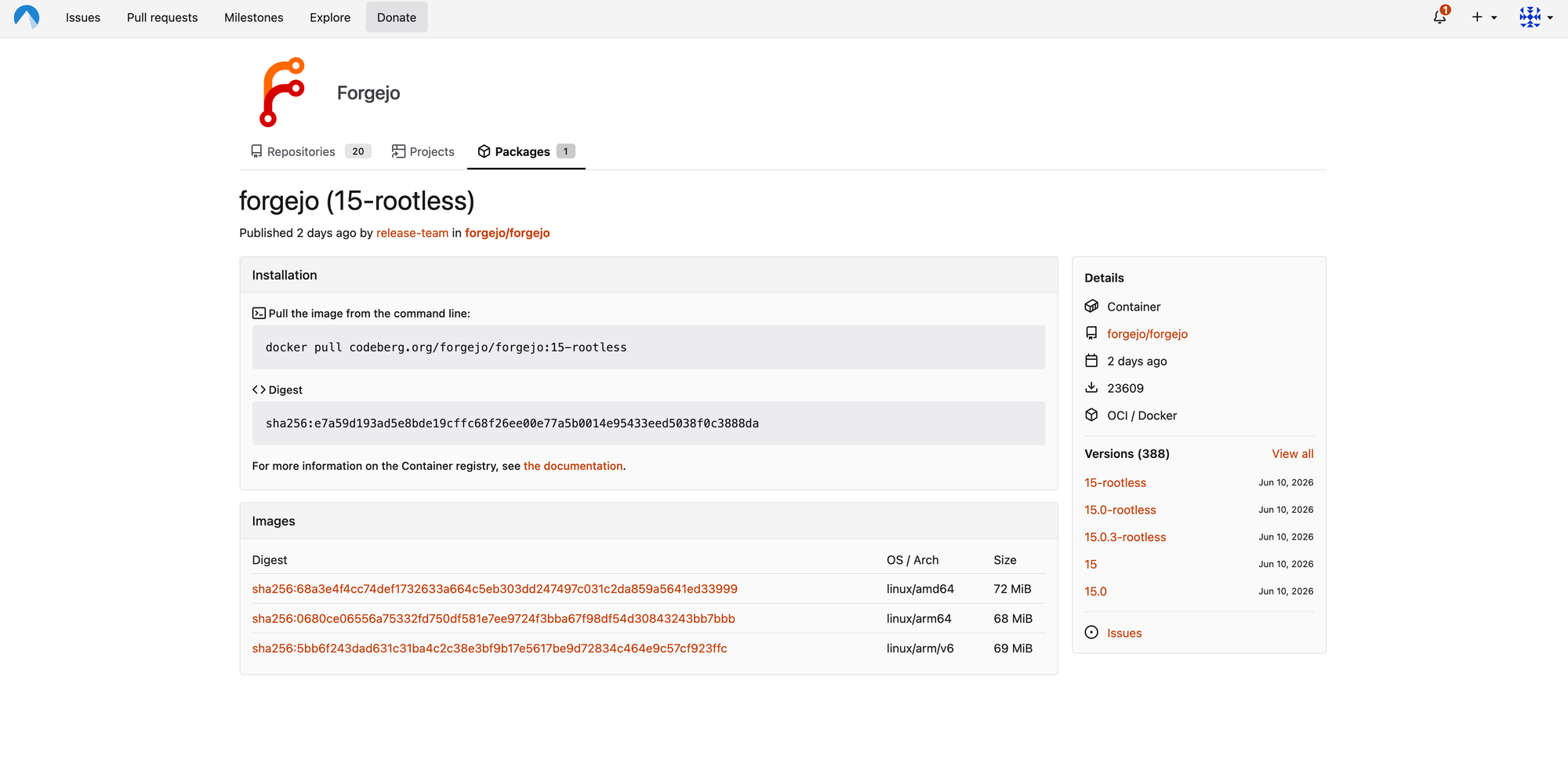
Forgejo includes package registry functionality, allowing teams to publish and consume packages close to the source code (Figure 3). Depending on the version and configuration, this can include container images and language-specific package formats. For organizations that want to reduce reliance on external package hosting, this can be useful.
A common pattern is to keep source code, CI workflows, release notes, binaries, and container images in one place. A pull request updates the code, Forgejo Actions runs the tests, a tag triggers a release workflow, and the resulting artifacts are published back to the Forgejo instance.
This is convenient, but administrators should plan storage from the beginning. Git repositories are usually not the only large data source on a forge. CI logs, caches, release attachments, package artifacts, and container images can consume storage quickly. If users start publishing large binaries or container images, a small virtual machine can run out of disk space much sooner than expected.
Production instances should therefore have monitoring for disk usage and a retention policy for old artifacts, logs, and packages. Backups should include not only the database and Git repositories but also uploaded attachments, LFS objects, package data, avatars, and configuration files.
Email, Notifications, and Authentication
Like most collaboration platforms, Forgejo becomes much more useful once email is configured correctly. Email is used for account confirmation, password resets, issue notifications, pull request updates, and administrative messages.
Configure SMTP in Forgejo's application settings and test it before inviting users. If email delivery fails, users may not receive password reset links or important notifications. As with other self-hosted tools, the most common problems are blocked outbound SMTP ports, incorrect TLS settings, authentication failures, or messages being classified as spam.
If your hosting provider blocks port 25 or 465, try port 587 with STARTTLS or use a dedicated transactional email provider. From the server, basic connectivity can be tested with Netcat:
nc -vz smtp.example.com 587
TLS can be tested with OpenSSL:
openssl s_client -starttls smtp -connect smtp.example.com:587
For production systems, also configure SPF, DKIM, and DMARC for the sending domain. Without those records, email notifications may work technically but still end up in spam folders.
Migration from Gitea, GitHub, or GitLab
Forgejo can import repositories from other forges, and Git itself makes repository migration relatively easy. The difficulty is usually not the Git history but the surrounding metadata: issues, pull requests, labels, milestones, releases, wiki pages, packages, CI configuration, protected branches, and user permissions.
For a simple repository, migration may be as easy as creating a new empty repository in Forgejo and pushing a mirror:
git clone --mirror https://github.com/example/project.git
cd project
git remote set-url origin ssh://git@git.example.com/team/project.git
git push --mirror
Gitea migrations deserve special attention. Because Forgejo started as a Gitea fork, many concepts are compatible, but the projects have diverged. The safest approach is to read the current Forgejo migration documentation, back up the database and repositories, and test the exact source and target versions before making changes in production.
Scaling and Operations
A small Forgejo instance can run on a single virtual machine with a database, reverse proxy, and local storage. This is one of the reasons it is attractive compared to heavier platforms. For a small internal team, such a setup can be entirely reasonable if backups and monitoring are in place.
As usage grows, the architecture should become more deliberate. The database can be moved to a separate server or managed database service. Object storage can be used for attachments, packages, or other large files. CI runners should be moved onto separate machines. The reverse proxy can be integrated with an existing load balancer or identity-aware access gateway.
The most important operational tasks are backups, upgrades, and monitoring. Backups should include the database, repositories, configuration file, custom templates, avatars, attachments, LFS data, package data, and any external object storage. Make sure to plan periodic fire drills where you restore Forgejo from your backups into a test environment.
Upgrades should be treated as normal infrastructure changes. Read the release notes, check for breaking changes, back up the instance, upgrade a staging system first if possible, and only then upgrade production. Forgejo is lightweight, but it is still a central development system. If it is unavailable, developers may lose access to repositories, issues, pull requests, and CI/CD pipelines.
Security Considerations
A Forgejo instance stores some of the most sensitive data an organization has: source code, private issues, deployment scripts, credentials in CI secrets, and release artifacts. It should therefore be treated as critical infrastructure.
Administrators should start with basic hardening. Keep Forgejo updated, run it as a dedicated unprivileged user, put it behind HTTPS, restrict administrative access, and avoid exposing unnecessary ports. SSH access should be limited to Git operations, and system SSH access to the server should be restricted to administrators.
Secrets require special attention. Forgejo Actions can use secrets for CI/CD workflows, but secrets should only be available to workflows that actually need them. Be careful with pull requests from forks or untrusted contributors. A malicious workflow can try to print secrets, upload them as artifacts, or send them to an external server if the runner and workflow permissions allow it.
CI runners should be isolated from the Forgejo server itself. Do not run untrusted CI jobs on the same machine that stores the database and repositories. Avoid privileged containers unless absolutely necessary. If container builds are required, consider using dedicated build machines, rootless container engines, or isolated virtual machines.
It is also worth considering whether the Forgejo web interface should be public. Public open source projects may need a publicly reachable instance, but internal company forges often do not. Placing Forgejo behind a VPN, zero-trust proxy, or IP allowlist can reduce the attack surface significantly.
Review & Outlook
Forgejo is a strong option for teams that want self-hosted Git collaboration without running a heavyweight platform. It offers the features most small and mid-sized teams need, has an active community, and follows a governance model that is clearly different from commercial developer platforms.
Its biggest strengths are simplicity, low resource usage, community ownership, and a familiar developer experience. It is easy to install, easy to understand, and powerful enough for many real-world development workflows. The built-in issue tracking, pull requests, releases, package registry, and Forgejo Actions make it much more than a bare Git server.
Its main trade-off is that enterprise-grade features may be less extensive than in larger platforms. Advanced project planning, compliance workflows, analytics, policy enforcement, and large-scale administration are areas where organizations should evaluate their exact requirements before migrating. Forgejo is not a drop-in replacement for every GitHub Enterprise or GitLab Ultimate feature, and it does not pretend to be.
For startups, agencies, open source communities, research groups, and internal development teams that value control over their infrastructure, Forgejo is a very compelling choice. It provides a practical middle ground between a minimal Git server and a large commercial DevOps platform. For organizations that value autonomy, free software governance, and infrastructure ownership, Forgejo is one of the most interesting self-hosted Git platforms available today.
This article was made possible by support from Hetzner through Linux New Media’s Topic Subsidy Program.
Learn more about self-hosting on Hetzner infrastructure.