

For many organizations, instant messaging has become just as important as email. Slack, Microsoft Teams, and similar services provide convenient collaboration, but they also centralize communication on infrastructure controlled by external service providers. Messages, files, metadata, and user identities become tied to a particular vendor, and communicating with users outside that platform is usually limited to whatever interoperability the vendor chooses to provide.
Matrix takes a fundamentally different approach with an open protocol for decentralized real-time communication. Instead of all users connecting to one central service, organizations and individuals can operate their own Matrix servers while still communicating with users hosted elsewhere. The model resembles email more than Slack: A user hosted by one organization can communicate with users from another without either party having to create an account on the other's server.
Synapse is the best-known Matrix homeserver implementation (see Table 1). It started as the original reference implementation of the Matrix protocol and is now maintained primarily by Element. Synapse is responsible for user accounts, rooms, message history, federation with other Matrix servers, media storage, authentication, and communication with Matrix clients.
Importantly, Synapse itself is not the chat client. Users normally interact with it using a separate Matrix-compatible application. Element is the most prominent example, but there are many others. The separation between protocol, server, and client is one of the central ideas behind Matrix.
In this article, we will install Synapse, configure PostgreSQL and HTTPS, understand Matrix identities and federation, create users, configure OpenID Connect, discuss end-to-end encryption, set up Traversal Using Relays around NAT (TURN) for voice and video calls, examine media handling, and finally look at backups, monitoring, workers, scaling, and security.
| Name: | Synapse |
|---|---|
| URL: | https://github.com/element-hq/synapse |
| License: | AGPLv3-or-later or Element Commercial License |
| Documentation: | https://element-hq.github.io/synapse/ |
| First Release: | 2014 |
| Latest Release: | 1.163.0, October 2026 |
| Maintainer: | Element |
| Commercial Offering: | Element Server Suite/Synapse Pro |
Table 1: Synapse project information.
Understanding the Matrix Architecture
Before installing Synapse, it helps to understand which component does what. The general Matrix protocol and its components are shown in Figure 1. A minimal Matrix setup of a single homeserver is depicted in Figure 2.
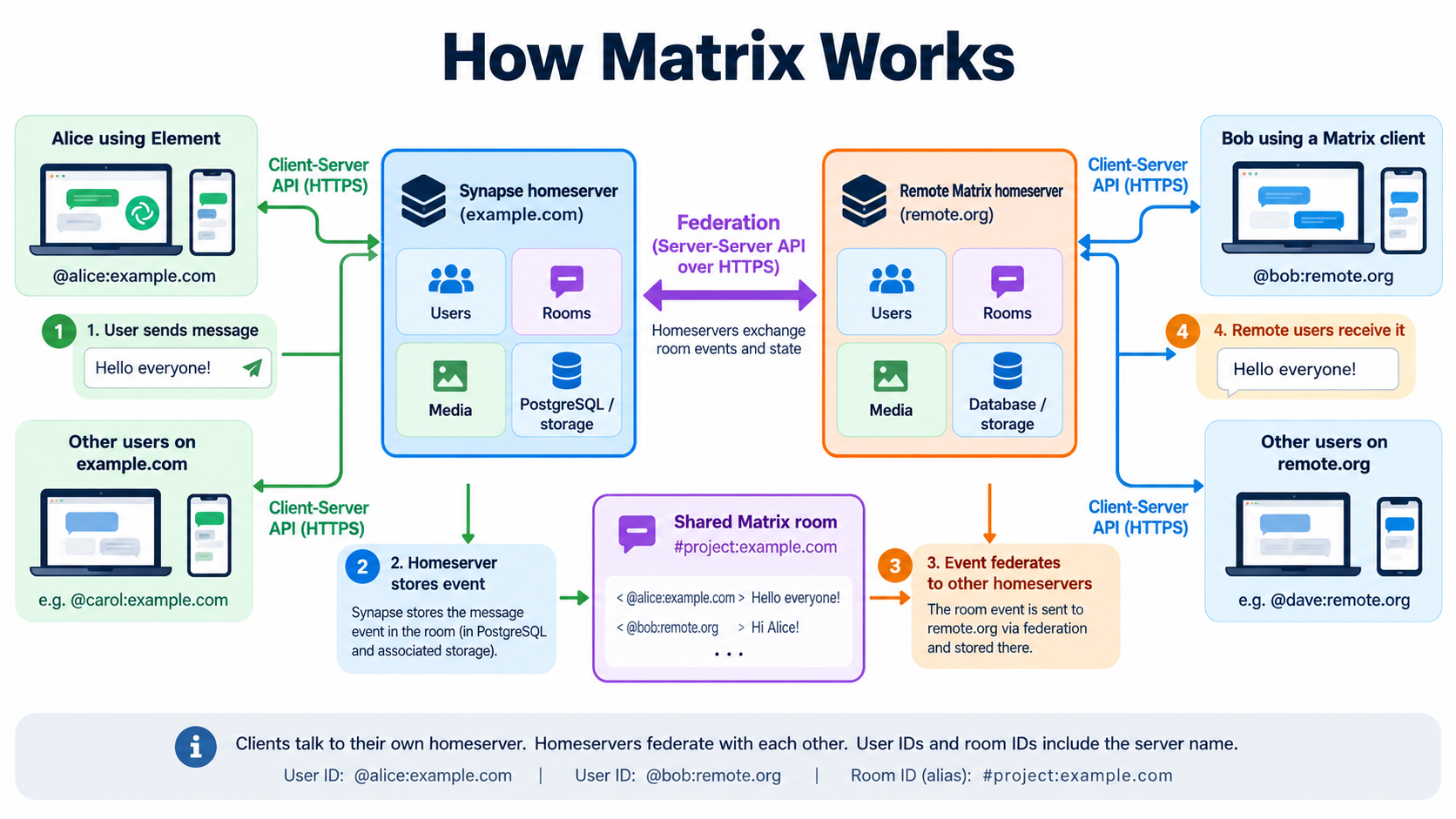
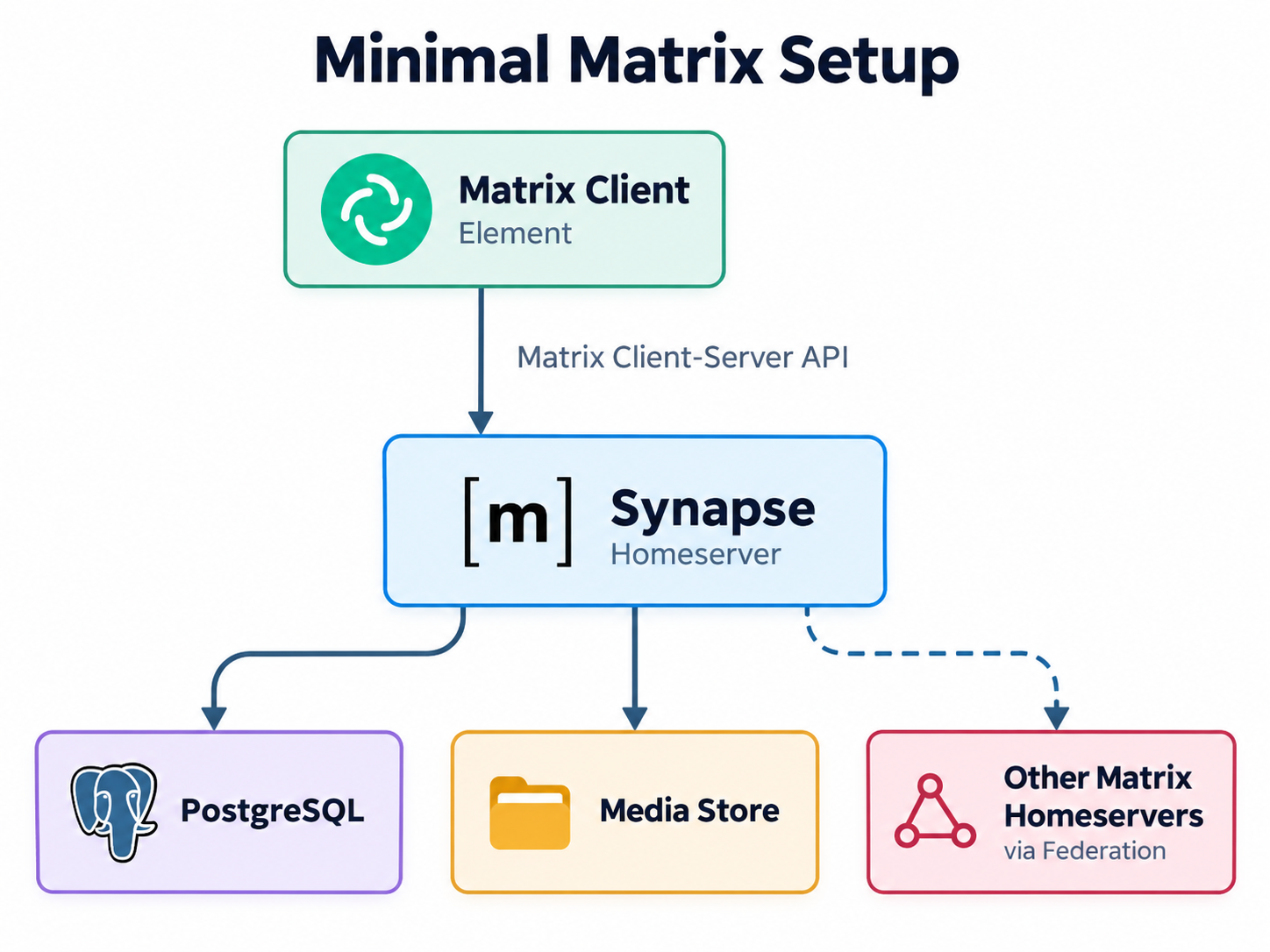
The client might be Element Web, Element Desktop, FluffyChat, or another Matrix-compatible application. It connects to Synapse through the Matrix Client-Server API.
Synapse stores accounts, rooms, room state, and event history in PostgreSQL and maintains uploaded files in its media store. When users communicate with people hosted elsewhere, Synapse exchanges events with the homeservers participating in the same rooms.
For example, in the following setup
@alice:example.com
        |
        v
Synapse at example.com
        |
        | Matrix federation
        v
Synapse at another.org
        |
        v
@bob:another.org
there is no central Matrix server through which all communication passes.
If Alice and Bob share a federated room, both homeservers participate in that room and retain the room information required by the protocol. If another user from a third server joins, that server becomes another participant in the distributed room.
This architecture has important operational consequences. Running Synapse is not quite the same as deploying an isolated internal web application. DNS names become identities, signing keys matter over long periods, federation makes the server reachable by remote infrastructure, and a room may contain data originating from dozens or hundreds of other servers.
Choosing the Server Name
One of the most important decisions must be made before creating the first user: the Matrix server_name.
Suppose the organization's domain is example.com. You could configure:
server_name: example.comUsers then receive Matrix IDs such as @alice:example.com and @bob:example.com.
Alternatively, you could use
server_name: matrix.example.comwhich produces @alice:matrix.example.com.
The first variant is usually nicer because Matrix IDs resemble normal organizational identities and do not expose an implementation detail.
The important point is that server_name is not simply the hostname on which Synapse happens to run. It becomes part of user IDs, room aliases, and the server's identity in federation.
Changing it later is, therefore, not comparable to moving a web application from one hostname to another. Once users and rooms exist, the server name is effectively part of their permanent identity.
A common deployment therefore looks like this:
- Matrix identity domain:
example.com - Actual Synapse endpoint:
matrix.example.com
Matrix delegation allows the two to differ.
That gives users clean IDs such as @alice:example.com, while the actual service can remain at https://matrix.example.com. Choose your structure before inviting users.
Installing Synapse
Synapse can be installed using distribution packages, Python packages, or containers. For a reproducible self-hosted deployment, the official container image is a convenient starting point.
Create a directory:
mkdir -p /opt/synapse/data
cd /opt/synapse
Generate the initial configuration:
docker run --rm \
    -v /opt/synapse/data:/data \
    -e SYNAPSE_SERVER_NAME=example.com \
    -e SYNAPSE_REPORT_STATS=no \
    ghcr.io/element-hq/synapse:1.163.0 generate
The command creates several files beneath /opt/synapse/data, including:
homeserver.yaml
example.com.signing.key
log.config
The signing key is particularly important. Synapse uses it to sign federation traffic and events associated with the homeserver. Back it up together with the configuration and treat it as part of the server's long-term identity. Do not simply regenerate it because the original file was lost.
The generated configuration can use SQLite, which is convenient for a quick demonstration. For anything intended to survive beyond testing, use PostgreSQL, which is also required if the installation later grows into a multi-worker deployment.
Adding PostgreSQL
A simple Docker Compose setup can run PostgreSQL and Synapse together:
services:
  postgres:
    image: postgres:17
    restart: unless-stopped
    environment:
      POSTGRES_USER: synapse
      POSTGRES_PASSWORD: CHANGE_ME
      POSTGRES_DB: synapse
      POSTGRES_INITDB_ARGS: "--encoding=UTF8 --locale=C"
    volumes:
      - ./postgres:/var/lib/postgresql/data

  synapse:
    image: ghcr.io/element-hq/synapse:1.163.0
    restart: unless-stopped
    depends_on:
      - postgres
    volumes:
      - ./data:/data
    ports:
      - "127.0.0.1:8008:8008"
Now replace the database section in homeserver.yaml:
database:
  name: psycopg2
  args:
    user: synapse
    password: CHANGE_ME
    database: synapse
    host: postgres
    port: 5432
    cp_min: 5
    cp_max: 10
Start the installation:
docker compose up -dThen follow the logs:
docker compose logs -f synapseSynapse initializes its database schema automatically.
You can verify that the client-server API is responding with:
curl http://127.0.0.1:8008/_matrix/client/versionsThe response is JSON containing the Matrix API versions and capabilities advertised by the server.
PostgreSQL will eventually become one of the most important pieces of infrastructure in the whole deployment. Message history, room state, user accounts, device information, and most other durable Synapse states live there. Put the database on reliable storage and include it in monitoring and backup plans from the beginning.
Putting Synapse Behind a Reverse Proxy
Synapse normally listens on port 8008 using plain HTTP. That port should not be exposed directly to the Internet.
The normal production architecture is:
Internet
   |
   | HTTPS :443
   v
Reverse Proxy
   |
   | HTTP :8008
   v
Synapse
The reverse proxy handles TLS and forwards Matrix requests to Synapse.
With Caddy, a simple configuration looks like this:
matrix.example.com {
    reverse_proxy /_matrix/* 127.0.0.1:8008
    reverse_proxy /_synapse/client/* 127.0.0.1:8008
}
Synapse's listener must know that requests arrive through a trusted proxy:
listeners:
  - port: 8008
    tls: false
    type: http
    x_forwarded: true

    resources:
      - names:
          - client
          - federation
Set the public URL as well:
public_baseurl: "https://matrix.example.com/"The reverse proxy must preserve Matrix request URIs correctly. Matrix request signing and federation depend on the exact URI, so proxies must not unexpectedly decode or normalize request paths.
The back-end listener should also remain inaccessible from untrusted networks. If an attacker can connect directly to port 8008 while Synapse trusts forwarded headers, the proxy-based trust model no longer works as intended.
In Docker deployments where the proxy runs on the same host, publishing
127.0.0.1:8008:8008instead of
0.0.0.0:8008:8008is an easy way to avoid exposing the back end.
Client Discovery
While users have identities such as @alice:example.com, Synapse actually listens at https://matrix.example.com. Matrix clients need to discover that relationship. This is handled through a .well-known document served from the identity domain:
https://example.com/.well-known/matrix/clientThe response looks like this:
{
  "m.homeserver": {
    "base_url": "https://matrix.example.com"
  }
}
Browser-based clients also need an appropriate CORS header, commonly:
Access-Control-Allow-Origin: *A client presented with @alice:example.com can now query example.com, discover the actual homeserver endpoint, and continue authentication against matrix.example.com. This is useful because the public Matrix identity can remain stable even if the service is later moved to different infrastructure.
Federation
Federation is one of Matrix's defining features. Without federation, the architecture resembles a conventional internal messaging service:
Alice ──┐
Bob   ──┼── example.com
Carol ──┘
With federation, users from independent servers can share rooms:
@alice:example.com
        |
        v
   example.com
        |
        | federation
        |
   another.org
        ^
        |
@bob:another.org
Remote servers need to discover where federation traffic for example.com should be sent. By default, a server associated with example.com can be reached using the Matrix federation discovery rules, traditionally involving port 8448. But our Synapse server actually resides at matrix.example.com:443. We can therefore delegate federation.
Serve
https://example.com/.well-known/matrix/serverwith:
{
  "m.server": "matrix.example.com:443"
}
The resulting flow is:
Remote Homeserver
       |
       | discovers example.com
       v
/.well-known/matrix/server
       |
       v
matrix.example.com:443
       |
       v
Reverse Proxy
       |
       v
Synapse
Using port 443 also avoids opening a separate public 8448 listener.
Federation should be explicitly tested before users rely on the service. A server can appear completely healthy to local users while federation is broken because of incorrect delegation, DNS, certificates, proxy routing, or firewall rules.
What Federation Actually Means for Rooms
A Matrix room is not simply a database row stored on one central server. Imagine a room containing:
@alice:example.com
@bob:another.org
@carol:third.net
All three homeservers participate in the room. When Alice sends an event, her homeserver processes it and distributes the relevant event through federation. Other participating servers verify the event and incorporate it into their view of the room. Room state includes information such as:
- Membership
- Room name
- Power levels
- Join rules
- Encryption configuration
- Canonical aliases
This distributed model is what allows a Matrix room to continue existing across organizational boundaries. It also explains why large federated rooms can be significantly more expensive to operate than private rooms containing the same number of local users. Synapse has to maintain federation relationships, validate remote events, resolve state, and deliver outgoing traffic to other homeservers.
A server with 100 local users participating heavily in enormous public rooms can therefore experience more load than a server with 1,000 users communicating only internally. User count alone is not a particularly good capacity-planning metric for Matrix.
Creating Users
Public account registration should normally remain disabled on organizational servers:
enable_registration: falseUsers can instead be created administratively.
Synapse provides the register_new_matrix_user utility:
docker exec -it synapse \
  register_new_matrix_user \
  http://localhost:8008 \
  -c /data/homeserver.yaml
It prompts for:
New user localpart:
Password:
Confirm password:
Make admin [no]:
This mechanism uses the registration_shared_secret configured in homeserver.yaml:
registration_shared_secret: "LONG_RANDOM_SECRET"The shared secret's value is highly sensitive. Anyone who knows it can use the registration API to create users, including administrative accounts, even when normal registration is disabled.
For a handful of users, administrative registration works fine. For an organization with an existing identity provider, maintaining separate Matrix passwords quickly becomes unnecessary overhead.
That is where single sign-on becomes useful.
OpenID Connect and Single Sign-On
Synapse can authenticate users through an external OpenID Connect provider.
The architecture becomes:
Matrix Client
      |
      v
   Synapse
      |
      | OpenID Connect
      v
Identity Provider
The provider might be Keycloak, Authentik, Microsoft Entra ID, or another standards-compatible OpenID Connect service.
A simplified configuration looks like this:
oidc_providers:
  - idp_id: company
    idp_name: Company Login
    issuer: "https://id.example.com/"
    client_id: "synapse"
    client_secret: "CHANGE_ME"

    scopes:
      - openid
      - profile
      - email

    user_mapping_provider:
      config:
        localpart_template: "{{ user.preferred_username }}"
        display_name_template: "{{ user.name }}"
The exact claims depend on the identity provider.
Pay particular attention to the mapping between identity-provider users and Matrix localparts. If
preferred_username = alicemaps to
@alice:example.comthen changing the claim or template later can result in users receiving a different Matrix account. This becomes particularly troublesome after users have encrypted conversations, devices, and room memberships tied to their existing account. Treat the mapping rules as persistent identity configuration, not merely display settings.
For corporate environments, centralized authentication also makes offboarding easier. Disabling an employee at the identity provider can remove their ability to establish new Synapse sessions without maintaining a separate password lifecycle.
End-to-End Encryption
Many Matrix clients use end-to-end encryption for private conversations. In an encrypted room, the client encrypts message contents before sending them to Synapse:
Alice's Client
      |
      | encrypted event
      v
   Synapse
      |
      | encrypted event
      v
Bob's Client
Synapse stores and distributes the encrypted event but does not normally possess the keys needed to decrypt the message body. Encryption keys are managed by clients and can be shared between a user's verified devices.
Backing up the Synapse database does not necessarily give an administrator the ability to reconstruct plaintext conversations. That is a security feature, but users need appropriate key-backup and device-verification workflows if they want to recover encrypted history after losing every trusted device.
Also, server-side search of encrypted message contents is fundamentally different from searching ordinary plaintext server data. End-to-end encryption also does not make the homeserver irrelevant to security or privacy.
Synapse still sees substantial metadata:
- User accounts
- Room membership
- Device information
- Timestamps
- IP addresses
- Federation partners
- Event sizes
- Media requests
It also controls authentication and distributes encrypted events. A compromised homeserver therefore remains a serious incident even if attackers cannot immediately read the plaintext body of encrypted messages.
Media Storage
Matrix is not limited to text. Users upload images, documents, voice messages, videos, and other attachments. Synapse stores local media in its media repository. A typical configuration contains:
media_store_path: "/data/media_store"For small installations, keeping media on the same filesystem as the application data is sufficient. On larger installations, media often becomes one of the largest consumers of disk capacity. For example:
- PostgreSQL: 25 GB
- Configuration: <1 GB
- Media store: 500 GB
That makes media worth monitoring separately. Synapse distinguishes between locally uploaded media and media fetched from other homeservers. The latter acts largely as a cache. If Bob from another.org posts an image in a room Alice reads, Alice's Synapse server may retrieve and cache the image locally.
Consequently, the number of local users does not directly predict the media storage consumption. A handful of users participating in image-heavy public rooms can generate significant remote-media usage. Set upload limits appropriate for the environment and monitor storage growth.
Media Backups
Not all parts of the media directory have equal backup value. Local media uploaded by your own users may exist nowhere else and should generally be backed up. Remote media can usually be fetched again from its original homeserver and behaves more like a cache.
The practical distinction is approximately:
local_content
    -> important, back it up

local_thumbnails
    -> consider backing up

remote_content
    -> generally reproducible cache

remote_thumbnails
    -> generally reproducible cache

URL preview cache
    -> disposable
This distinction can dramatically reduce backup size on a large federated server. Do not simply copy the entire media tree forever without understanding what the directories contain.
Voice and Video Calls
Matrix voice and video communication uses WebRTC. Synapse participates in signalling, but it is not sufficient on its own to make calls reliable across arbitrary networks. Clients often sit behind home routers, corporate firewalls, carrier-grade NAT, or mobile networks and may be unable to establish a direct peer-to-peer path.
A TURN server provides a relay when direct connectivity fails:
Alice
  |
  | WebRTC media
  v
TURN Server
  |
  | WebRTC media
  v
Bob
Coturn is a common choice.
Synapse can be configured like this:
turn_uris:
  - "turn:turn.example.com:3478?transport=udp"
  - "turn:turn.example.com:3478?transport=tcp"

turn_shared_secret: "LONG_RANDOM_SECRET"
turn_user_lifetime: 1h
turn_allow_guests: false
The same shared secret is configured on Coturn.
Expose UDP when possible because it normally gives the best real-time media behavior, while TCP can provide a fallback for restrictive networks.
TURN can become bandwidth-intensive. If two users relay a video call through your server, the media traffic passes through your infrastructure for the duration of the call. A Matrix server with light text traffic may therefore require unexpectedly significant network capacity once users start making video calls.
Test TURN from genuinely external networks. Testing two clients on the same LAN proves very little.
Sending Emails
Synapse can use SMTP for password resets, email verification, and notifications. A typical configuration looks like this:
email:
  smtp_host: "mail.example.com"
  smtp_port: 587
  smtp_user: "matrix@example.com"
  smtp_pass: "CHANGE_ME"
  require_transport_security: true
  notif_from: "Matrix <matrix@example.com>"
Before debugging Synapse itself, verify SMTP connectivity independently:
openssl s_client \
  -starttls smtp \
  -connect mail.example.com:587
For implicit TLS, use:
openssl s_client \
  -connect mail.example.com:465
As with the other systems in this article series, SMTP delivery involves more than establishing a TCP connection. Configure SPF, DKIM, and DMARC for the sending domain if messages are delivered through the public Internet.
If users authenticate exclusively through OIDC, password-reset mail may become less important because credentials are managed by the identity provider, but notifications and verification workflows can still depend on email.
URL Previews
Matrix clients can display previews when users paste URLs into rooms. Synapse can retrieve the referenced page and extract metadata:
url_preview_enabled: trueThis feature deserves more security attention than its user-interface appearance suggests. Consider a malicious user posting:
http://127.0.0.1:8008/
http://10.0.0.5/
http://169.254.169.254/
If Synapse blindly retrieved arbitrary URLs, it could be abused for server-side request forgery against internal services or cloud metadata endpoints.
Synapse therefore supports an IP-range blacklist. At minimum, block loopback, private and link-local networks:
url_preview_ip_range_blacklist:
  - "127.0.0.0/8"
  - "10.0.0.0/8"
  - "172.16.0.0/12"
  - "192.168.0.0/16"
  - "169.254.0.0/16"
Equivalent IPv6 ranges also need consideration. If the server sits inside a corporate network with additional internal ranges, blacklist those too. This is a good example of why a collaboration server must be treated as infrastructure rather than merely as another web interface.
Backups
A Synapse backup requires several different components. At minimum, you need the following:
- A PostgreSQL database
homeserver.yaml- Logging and auxiliary configuration
- Server signing key
- Application-service registrations
- Media uploaded by local users
The PostgreSQL database is the main durable state store. For a small installation, a basic dump might be:
docker exec postgres \
  pg_dump -U synapse -Fc synapse > synapse.dump
For larger production installations, use PostgreSQL-native backup mechanisms capable of continuous recovery, such as Write-Ahead Log (WAL) archiving combined with an appropriate backup tool.
The Synapse signing key deserves separate attention. Losing the running server and database is already inconvenient; losing its cryptographic identity at the same time makes recovery more difficult. Keep configuration and keys in an encrypted off-site backup.
The media repository can be handled separately because local and remote media have different recovery value.
Scaling with Workers
For small installations, Synapse's own documentation recommends the monolithic mode. The architecture remains simple:
Clients and federation
        |
        v
Reverse Proxy
        |
        v
     Synapse
        |
        v
   PostgreSQL
When performance requirements increase, Synapse can split work into multiple processes called workers. A larger deployment may look like the one depicted in Figure 3.
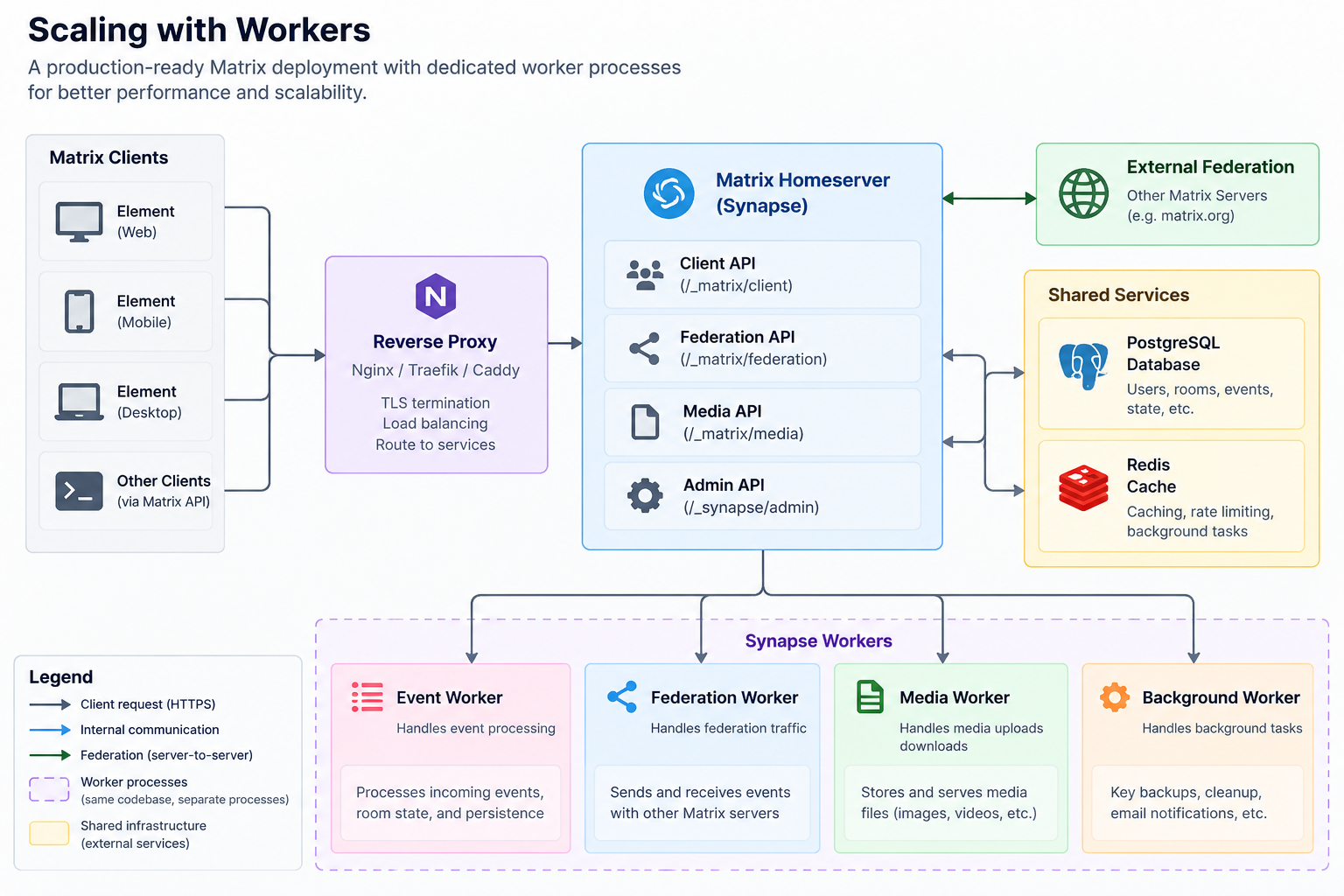
All processes still use the same PostgreSQL database.
Redis distributes Synapse's replication stream between the processes and can also provide shared caching. Workers may additionally communicate directly over HTTP where operations require a response.
Multiple generic workers can handle client or federation endpoints and can be load-balanced by the reverse proxy.
Other background tasks can also be assigned to specific worker instances.
This makes horizontal scaling possible, but it also changes the operational complexity substantially. Instead of Synapse + PostgreSQL you now operate:
- Reverse proxy
- Several Synapse processes
- Redis
- PostgreSQL
- Endpoint routing rules
- Shared configuration
- Worker-specific configuration
Do not start with workers because a diagram looks more "production grade." Start with the monolith and introduce workers only when monitoring identifies an actual bottleneck.
PostgreSQL Is Still the Center
Adding workers does not distribute the database. All Synapse processes continue to depend on the same logical PostgreSQL instance. Therefore "more workers != no database bottleneck." Quite often, scaling the front end simply makes PostgreSQL performance more important.
Monitor at least:
- CPU
- Memory
- Disk latency
- Connection count
- Cache hit rate
- Long-running queries
- Checkpoint behavior
- WAL generation
- Database size
Fast SSD storage for PostgreSQL can be more valuable than adding additional application workers while leaving the database on slow disks. If PostgreSQL goes down, the worker cluster does not magically keep Matrix operational.
For a larger Synapse deployment, database availability and recovery objectives therefore deserve at least as much attention as the Synapse processes themselves.
Redis
Redis is required for normal multi-worker Synapse deployments. It acts as the communication channel for the replication stream between Synapse processes:
Worker A ----\
              \
Worker B ---- Redis ---- Worker C
              /
Main process /
PostgreSQL remains the durable system of record. Redis therefore has a different persistence role than PostgreSQL. Losing Redis is not equivalent to losing the message database.
But if Redis is unavailable, the workers cannot coordinate correctly and service availability suffers. For highly available deployments, Redis must consequently be treated as another availability dependency even though it does not contain the authoritative room history.
Also keep worker replication interfaces private. They are internal service endpoints and should never be exposed to the public Internet.
Federation or No Federation?
One architectural choice deserves an explicit decision: Should the homeserver federate with the public Matrix ecosystem at all? For many deployments, federation is the main reason to choose Matrix.
It allows employees, partners, customers, open source communities, and other organizations to communicate without everyone creating an account at one provider. But federation also widens the operational and security boundary.
A federated Synapse server receives data from remote homeservers, fetches remote media, and communicates with infrastructure outside your control.
An isolated internal setup is simpler:
Company Clients
       |
       v
Company Synapse
A federated setup is intentionally more open:
Company Synapse
   /    |     \
  v     v      v
Server A Server B Server C
Synapse can also restrict federation to a defined list of domains, which can be useful for a private federation between several organizations. For example, three company sites could federate only with each other rather than with the entire Matrix network. Whether that is worthwhile depends on the requirements.
Do not enable or disable federation merely because one choice sounds more secure. Decide whether cross-domain communication is part of the service's purpose.
Administration
Synapse exposes an administration API for operations such as:
- Creating and deactivating users
- Inspecting rooms
- Deleting rooms
- Managing media
- Inspecting devices
- Querying accounts
- Managing server state
Administrative access tokens are therefore powerful credentials. Do not place them in shell scripts committed to source control or casually export them as environment variables on shared systems. Administration front ends can make the API easier to use, but they do not make the underlying permissions less powerful.
If an administration interface is deployed, keep it on a trusted network or behind strong authentication. Regular administrative tasks should also include lifecycle cleanup:
- Deactivate former users
- Review administrators
- Review application services
- Remove abandoned bridges
- Check media growth
- Check inactive accounts
- Review registration settings
A messaging system tends to accumulate users and integrations quickly. Without cleanup, temporary arrangements become permanent infrastructure.
Security
A Synapse homeserver is Internet-facing infrastructure processing authentication, private communication, uploaded files, and potentially arbitrary federated input. Treat it accordingly.
First, keep Synapse current. Federation exposes protocol parsers and APIs to systems outside your control, so security updates deserve prompt attention.
Second, expose only necessary interfaces publicly. The Internet may need access to:
- Matrix client-server API
- Matrix federation API
.well-knowndiscovery- TURN
Third, keep registration closed unless a public service is intentional:
enable_registration: falseFourth, protect secrets. Important values include:
- Server signing key
- Database password
registration_shared_secret- OIDC client secret
- TURN shared secret
- Application-service tokens
- Administrator access tokens
Use proper secret-management practices and include important keys in encrypted backups.
Fifth, pay attention to outbound connectivity. URL previews can create Server-Side Request Forgery (SSRF) risks, federation talks to remote servers, and integrations may reach external APIs. Restrict internal address ranges and use network controls where appropriate.
Sixth, think about abuse if federation or public registration is enabled. Messaging infrastructure can be used for spam, harassment, illegal content, and denial-of-service traffic. Operating a public Matrix server is therefore a moderation task as well as a technical one.
Finally, remember that end-to-end encryption does not remove operational responsibility from the server administrator. Synapse still controls account authentication, room participation, federation, and substantial metadata.
Review & Outlook
Synapse is one of the more technically interesting self-hosted communication systems because it is not simply a centralized chat server with an open source license.
It implements a decentralized communications protocol. That distinction affects almost every operational decision. Domain names become user identities. Signing keys establish long-lived server identity. Rooms can span infrastructure operated by unrelated organizations. Federation introduces queues and remote dependencies. Media can originate on other servers. End-to-end encryption shifts part of the security model from the server to users' devices.
Add TURN when reliable voice and video calls are required. Add OIDC when accounts should follow the organization's identity provider. Add monitoring before users become dependent on the service. Add workers and Redis only when measurements show that a single Synapse process is actually becoming the limiting factor.
Synapse's strongest advantage is the control it gives the operator without giving up interoperability. An organization can host its own users, database, and media while those users still communicate with people elsewhere in the Matrix ecosystem. Users can choose different clients without migrating accounts, and an organization does not need to convince every external partner to join the same SaaS provider before they can share a room.
That freedom comes with more operational responsibility than a hosted chat service.
PostgreSQL has to be backed up and monitored. The server signing key must survive disasters. Federation depends on correct DNS, TLS, and reverse-proxy behavior. Media consumes storage. Calls require TURN. Public federation may introduce moderation and abuse concerns. Upgrades can include database migrations. Larger deployments eventually require Redis, workers, and careful request routing.
None of these requirements is unusual individually, but together they make Synapse a real infrastructure service rather than a Docker container that can be forgotten after installation.
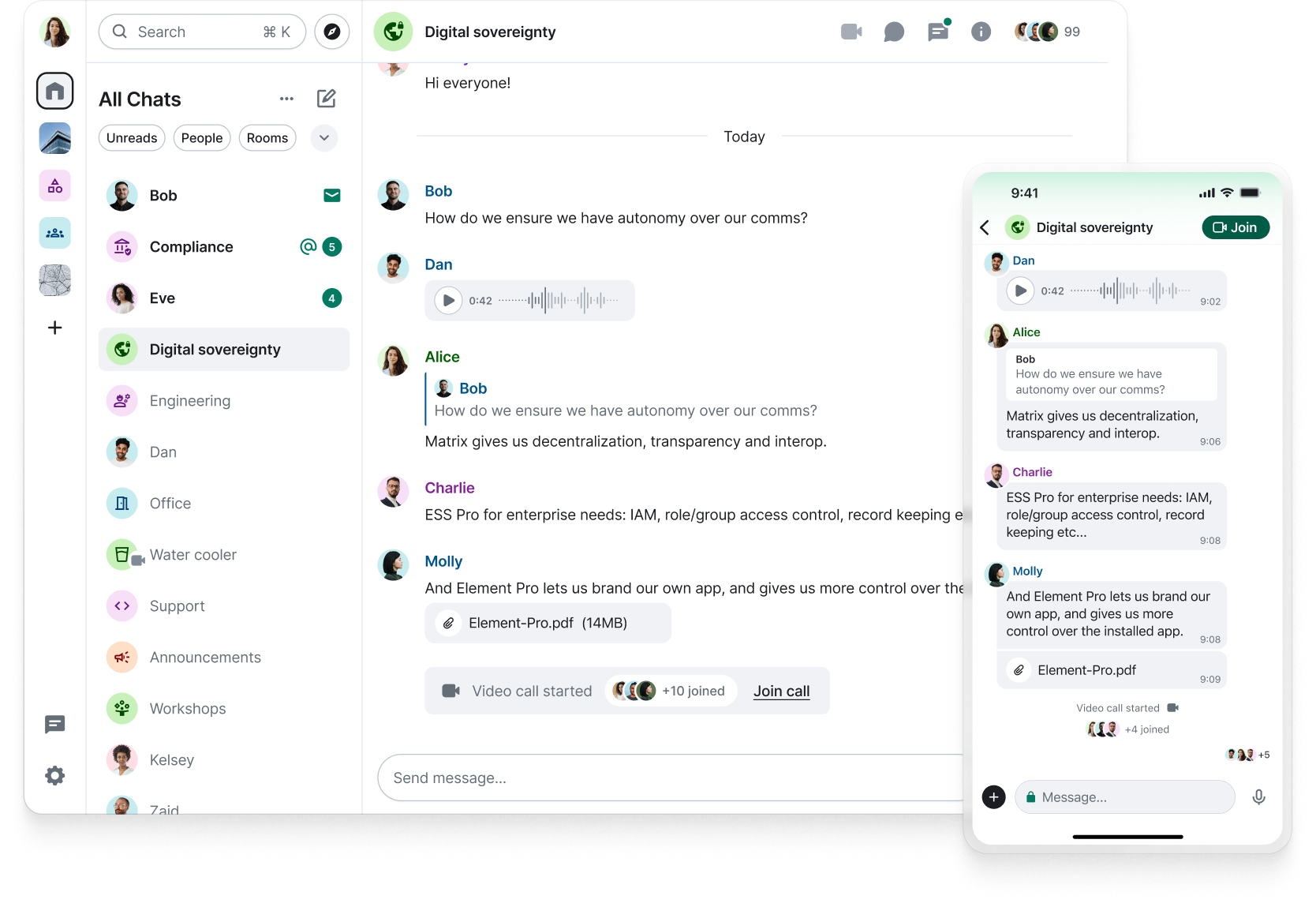
For organizations willing to operate that infrastructure, the result is compelling: a self-hosted communication system whose users are not isolated from the outside world simply because the server is under local control, while at the same time providing a user experience that most users will already know from similar services. See Figure 4 for an example.
The best Synapse deployment is therefore not necessarily the most elaborate one. It is the one whose architecture matches its actual workload: a stable server name, PostgreSQL on reliable storage, a correctly configured reverse proxy, tested federation or a deliberate decision not to federate, proper backups, working TURN where needed, and monitoring that reveals problems before users do.
With those foundations in place, Synapse provides a mature and highly flexible basis for running Matrix under your own control while still participating in a decentralized communications network.
This article was made possible by support from Hetzner through Linux New Media’s Topic Subsidy Program.
Learn more about self-hosting on Hetzner infrastructure.